
Choose a Fitness Age app for Apple Watch by the result you want to follow. Fitness Age by Ampwater has a Watch app and flexible history graphs. Body Insights shows your age estimate with its source and monthly history. Health Hive compares several health measures. Mia Health links its age estimate to activity.
An app can use Apple Watch data while showing Fitness Age on iPhone. Check that detail before you choose, especially if you want to use the app on your wrist.
Body Insights
Turn Cardio Fitness into your Fitness Age.
Body Insights reads Apple Health data from Apple Watch and translates it into energy, recovery, and pacing guidance.
See my Fitness AgeCompare Fitness Age apps for Apple Watch
These four apps calculate Fitness Age in different ways. The table shows each app's use and how it connects to Apple Watch.
Swipe the table to see all columns on a small screen.
| App | Fitness Age method | Apple Watch connection | Choose it for |
|---|---|---|---|
| Fitness Age by Ampwater | Converts Apple Health VO2 max into an age. | Includes a Watch app and watch face complications. | Choice of reference data and flexible history graphs. |
| Body Insights | Uses your selected VO2 max and profile. | Fitness Age is on iPhone. It can use Watch records from Apple Health. | A clear age gap, source details, and monthly history. |
| Health Hive | Combines several health measures with peer comparisons. | Reads Watch data through Apple Health on iPhone or iPad. | Seeing how several readings compare with similar users. |
| Mia Health | Calculates an age through its activity-based approach. | Imports Watch data into its iPhone app. | Following Fitness Age alongside activity over time. |
VO2 max is a measure of how much oxygen your body can use during hard exercise. It accounts for your body weight. Apple Watch can estimate it during supported outdoor workouts. Some apps use that estimate. Others use more health or activity data to calculate an age.
Fitness Age by Ampwater: Watch app and reference choice
Fitness Age by Ampwater turns Apple Health Cardio Fitness records into a Fitness Age. It also shows relative age and percentile. Relative age compares the result with your actual age. Percentile shows where you sit within a reference group.
You can choose the reference data and adjust the history graphs. That makes it useful if you want more control over how the app compares your VO2 max. Keep the same reference data when you compare results across dates.
Ampwater includes a native Apple Watch app and watch face complications. It is the option to check first if wrist access is part of your choice. Check its Watch screens and supported complications for the view you want.
The free version includes three months of history. An in-app purchase extends access to features and history.
Body Insights: source details and monthly history
Body Insights shows Fitness Age in whole years on iPhone. It uses your selected VO2 max, current age, and biological sex. You can see the age gap, fitness level, and age-group ranking beside your history.
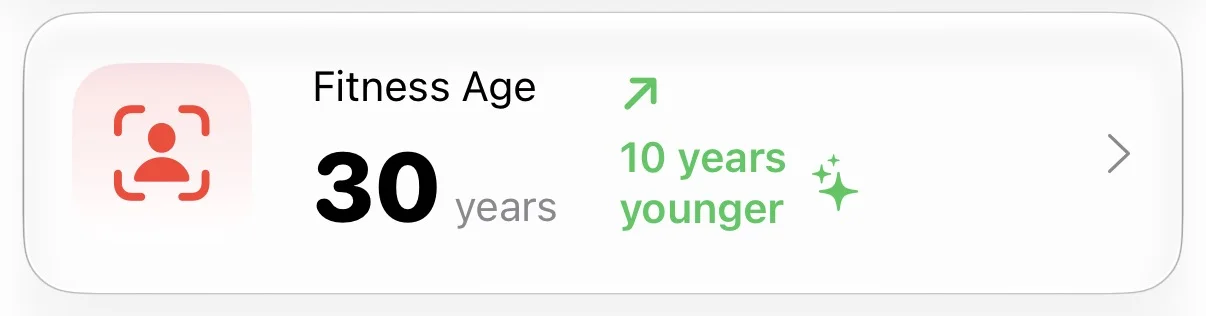
Open the Body tab, then tap Fitness Age. If your profile needs details, the app opens User Information first. The card below shows a Fitness Age of 30 for someone aged 40. The 10-year gap compares that estimate with their actual age.
Current Fitness Age and history use distinct sources
Body Insights uses Apple Health VO2 max by default. You can also select the app's calculated VO2 max. Your current Fitness Age follows that choice. Open Contributing Factors, then VO₂ Max, to check the source.
The monthly history always uses Apple Health VO2 max records. Changing the current source does not change the history's source.
| View | Data source | What to read |
|---|---|---|
| Current Fitness Age | Your selected VO2 max and profile. | Your displayed age and the source behind it. |
| Fitness Age Trend | Average Apple Health VO2 max for each available month. | Results across the six completed months. |
| Improvement | The first and last available monthly Fitness Age results. | The direction of change across that history. |
The trend leaves out the current month and months with no usable records. A lower Fitness Age is the improvement direction. A missing month means the app lacks a usable record for that month.
Check the offer shown in Body Insights for Fitness Age access. You can also use the free Fitness Age calculator in your browser.
Health Hive: compare several health measures
Health Hive builds Fitness Age from several health measures. These include VO2 max, heart rate variability, and resting heart rate. It compares your readings with users of similar age and body mass index, or BMI.
Health Hive reads Apple Health data on iPhone and iPad. Watch health records reach the app through Apple Health. You read Health Hive's views on your phone or tablet.
This app suits readers who want to see how several readings compare with those of similar users. It also shows how health measures change over time. Its age can differ from one based on VO2 max alone because it uses more inputs and a different comparison group.
Health Hive offers a free download with an optional Premium subscription. Check which views the app includes before you pay.
Mia Health: Fitness Age alongside activity
Mia Health uses activity to calculate VO2 max and Fitness Age. It also gives you Activity Quotient points, called AQ. You earn these points through activity that raises your heart rate.
Mia Health imports Apple Watch data through Apple Health. You read its Fitness Age results in the iPhone app. Mia builds its age estimate from activity. Apps such as Ampwater use Apple's Cardio Fitness records instead.
Choose Mia if you want to follow Fitness Age alongside your activity history. It shows trends so you can review change over time. Basic AQ tracking is free; Fitness Age tracking is part of Mia Premium.
Apple Health: check the source data
Apple Health stores Cardio Fitness as VO2 max. Apple Watch estimates this during supported Outdoor Walk, Outdoor Run, and Hiking workouts. Indoor workouts do not produce this Apple Watch estimate.
On iPhone, open Health, tap Search, then Heart, then Cardio Fitness. Check the latest reading and its date. Apple Health provides the source measurement for apps that use it. Those apps add their own age calculations.
For Body Insights setup and source checks, follow how to find your Fitness Age with Apple Watch.
Compare changes within the same app
Two apps can show different ages from the same Watch data. Their inputs and reference groups can differ. A change in your selected source can also change the result.
Before you compare two dates, check the source and keep your profile details correct. Use the same app and method to follow a trend.
Choose Ampwater for its Watch app and reference choice. Choose Body Insights for the age gap, source details, and monthly history on iPhone. Health Hive fits peer comparisons across several measures. Mia Health fits activity tracking with Fitness Age trends.
Check that your chosen app can use the records you already have. Then choose one view to follow over time. The Fitness Age and actual age guide explains how to read the gap.
Body Insights
Turn Cardio Fitness into your Fitness Age.
Body Insights reads the Apple Watch data you already have and turns it into a plain daily read on energy, recovery, and pacing.
See my Fitness Age