
Yes, an Apple Watch is worth it for POTS: it tracks your heart rate all day, and with the right app it taps your wrist when a standing spike starts. Add Body Insights to see what each day cost you, so you can pace the next one.
Three jobs make the watch useful with POTS. It warns you when your heart rate climbs. It records a standing test you can show your doctor. And it keeps a running record of sleep, resting heart rate, and HRV that explains your good and bad days. This guide sets up all three.
Body Insights
Plan today around the energy you have.
Body Insights reads Apple Health data from Apple Watch and translates it into energy, recovery, and pacing guidance.
Get my pacing readIs an Apple Watch worth it for POTS?
For most people with POTS, yes. The watch measures your heart rate in the background from 30 to 210 beats per minute, according to Apple's heart rate guide. You see the number without stopping to take a pulse.
The real value comes from what you do with that number. A wrist alert can tell you to sit down before you feel faint. A dated record helps your doctor see what happens when you stand. A morning view of your recovery helps you plan a smaller day after a bad night.
Turn on High Heart Rate notifications
Apple Watch has a built-in alert. Here is how to turn it on, from Apple's heart health guide:
- Open Settings on your Apple Watch.
- Tap Heart.
- Tap High Heart Rate Notifications and pick a threshold.
You can also set it on iPhone. Open the Watch app, tap My Watch, then Heart.
Apple's alert fires when your heart rate stays above that threshold after you've been inactive for at least 10 minutes. That makes it a good alarm for a high heart rate at rest. For a spike right after you stand up, add an app built for live alerts.
Add a live alert for standing spikes
POTS apps watch your heart rate while you move and alert you within seconds. Two lead on Apple Watch.
TachyMon taps your wrist when your heart rate crosses a limit you set. It can also alert on a jump from your recent average, which suits a sudden rise on standing. Each alert saves its start time, length, and peak heart rate. The core alerts are free.
POTS Buddy has two alert levels: a gentle heads-up and an urgent alert for big spikes. You can log a symptom like dizziness from the Digital Crown, and each entry gets a timestamp.
Set the limit with your doctor, then test it on a normal day. If it buzzes during every walk to the kitchen, raise it a little. Our best Apple Watch apps for POTS compares seven options.
Record a stand test for your doctor
Doctors look for a rise of 30 beats per minute within the first 10 minutes of standing, according to PoTS UK's diagnosis guide. Some ask patients to do a stand test at home before an appointment.
POTS Buddy guides the test on your watch. You rest for five minutes, then stand for ten. It records your heart rate at 1, 3, 5, and 10 minutes after you stand. You can export the result as a PDF or CSV and bring it to your visit.
Your watch records the numbers. Your doctor makes the diagnosis.
Keep a record of good and bad days
PoTS UK suggests noting heart rate, posture, and symptoms at the same time. It also suggests keeping recordings from one good day and one bad day, since your doctor won't have time to read pages of numbers.
Body Insights makes that record quick. Its daily check-in lets you rate the day from Very rough to Good. You can tag symptoms such as dizziness on standing or brain fog, and add a note. Symptoms like fatigue and headache save to Apple Health, next to your heart and sleep data. A few weeks of check-ins show which days went badly, and what your watch saw before them.
Pace the next day with Body Insights
A spike costs more than the moment it happens. A bad standing day can leave you drained the next morning. That's the gap Body Insights fills.
Turn on Manage a Chronic Condition, and the Daily Coach compares today with your own baseline. It shows Above Your Usual, Your Usual, Below Your Usual, or Still Learning, with a short reason below. When your waking recovery drops below your usual range, the advice can say, "Rest before you feel you need it."
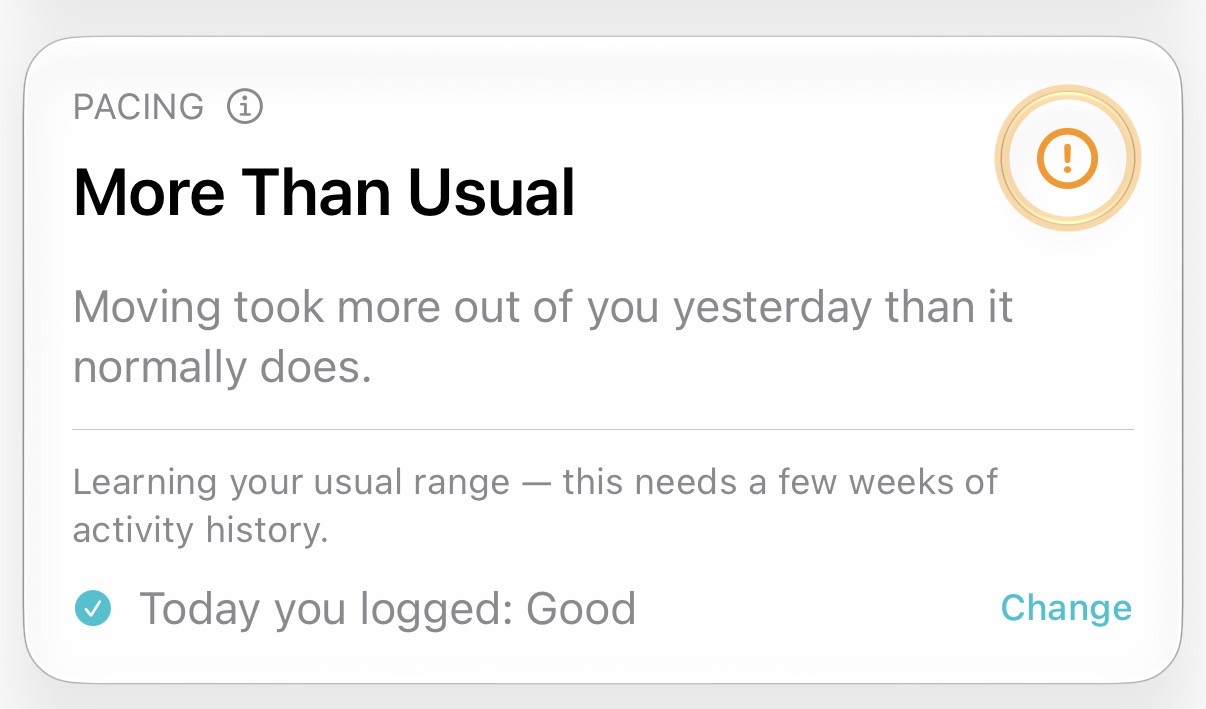
Its Pacing mode learns your usual activity range from your own Watch history. Each day it forecasts the energy you have. It flags days that run close to your ceiling, or follow three days above your norm. It also spots days when light movement costs your heart more than usual.
Here's how that helps. Say you stood through a long shower, a school run, and a queue at the pharmacy. TachyMon buzzed three times. The next morning, Body Insights shows your recovery below your usual. You move the grocery run to tomorrow.
Body Battery, HRV, sleep, and stress scores are free on iPhone. Premium unlocks Pacing and the Watch app.
Which Apple Watch is best for POTS?
Any recent Apple Watch measures heart rate and supports High Heart Rate notifications. Two differences matter.
- Series 12 and Ultra 4 measure heart rate as often as every five seconds during the day, even while you move.
- ECG works on Apple Watch Series 4 and later and on Ultra. It isn't supported on Apple Watch SE.
POTS is about heart rate, not rhythm, so an SE still covers the alerts and stand test. Choose a Series model if you also want ECG readings for your doctor.
Related reading
- Best Apple Watch apps for POTS
- Heart-rate alerts for pacing
- Pacing for POTS around upright time
- Best Apple Watch apps for chronic illness
- Best long COVID apps for Apple Watch
- How to tell if you are overdoing it before you crash
Download Body Insights and turn on Manage a Chronic Condition. After your next hard standing day, check your morning recovery before you plan the day.
Body Insights
Plan today around the energy you have.
Body Insights reads the Apple Watch data you already have and turns it into a plain daily read on energy, recovery, and pacing.
Get my pacing read