
Updated September 2, 2026 by Body Insights.
Body Insights is the best Body Battery app for Apple Watch if you want a 0 to 100 current reserve with a visible recharge breakdown. In Body Insights, Apple Watch shows your current percentage and trend. The iPhone card shows carry-over, points added by sleep, your starting reserve, and what remains now.
Apple Watch does not include Garmin's Body Battery number. It records measurements, and Apple Health stores the supported records. Each app uses its own calculation, so the useful differences are what the score means, when it changes, and how much detail sits behind it.
Body Battery apps compared
These six apps all turn Apple Watch data into a battery, energy, or recovery view. Their scores behave differently. The table shows each result and its best use. The sections below explain the inputs and update patterns.
| App | Read, detail, and best fit |
|---|---|
| Body Insights | Read: 0 to 100 current reserve. Detail: Carry-over and sleep points build the starting reserve, then daytime use lowers it. Best fit: Daily pacing. |
| BodyState | Read: 1 to 100 daily energy score. Detail: Uses sleep, HRV, resting heart rate, and recent exertion. Best fit: One score with training context. |
| Body Battery: Energy Tracker | Read: Daily Body Battery score. Detail: Uses HRV, resting heart rate, workouts, and sleep. Best fit: A simple score with a familiar battery label. |
| Bevel | Read: Energy Bank. Detail: Sits beside Recovery, Sleep, Strain, and Stress. Best fit: A broad health and training dashboard. |
| Athlytic | Read: All-day HRV Battery. Detail: Updates when new HRV samples arrive and sits beside a morning Recovery score. Best fit: Training. |
| PeakWatch | Read: Body Energy. Detail: Uses sleep, recovery, activity, and stress, then changes through the day. Best fit: Built-in AI questions. |
Body Insights
See what built today's reserve.
Body Insights shows a current 0 to 100 reserve, plus carry-over, sleep added, and starting reserve on iPhone.
See my Body Battery1. Body Insights: best for an explainable 0 to 100 reserve
Body Insights shows a 0 to 100 current reserve on iPhone and Apple Watch. Carry-over from the previous cycle and points restored by sleep build the starting reserve. Energy use during the day lowers the current reserve.
The iPhone card separates carry-over, Sleep added, Starting reserve, and Current reserve. Apple Watch shows the current percentage and daily trend. The two views can differ for a short time because they can refresh at different times as new Apple Health records arrive.
In the iPhone example below, 36% carried over and sleep added 51 points, which built an 87% starting reserve. The current reserve is 71% at 11:34. The separate Apple Watch example shows the current percentage and trend. Compare the result with how you feel before you decide what else fits into the day.
iPhone recharge breakdown

Apple Watch current reserve
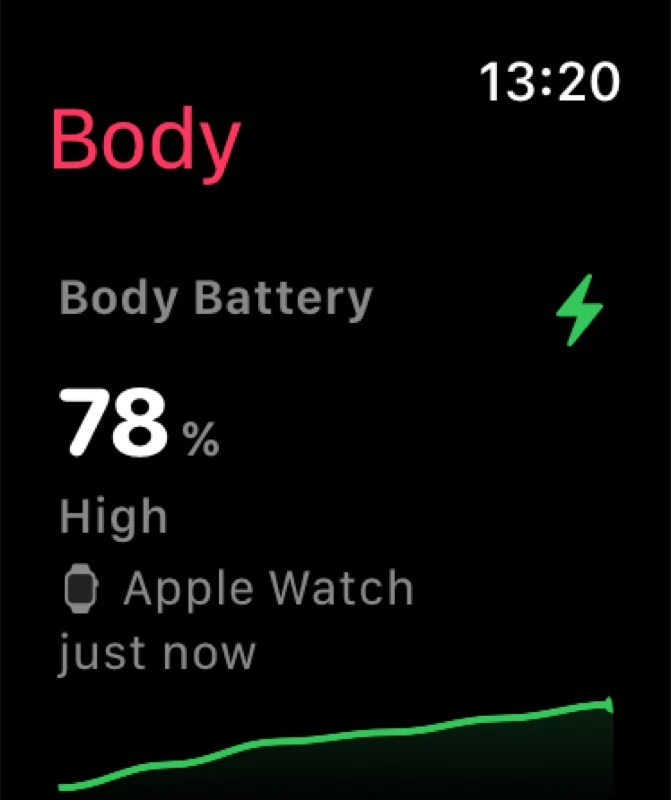
Use this breakdown before work, errands, exercise, or a planned rest. The number does not overrule how you feel. See how Body Insights builds and displays Body Battery for the full card and device comparison.
2. BodyState: best for one daily energy score
BodyState gives you an energy score from 1 to 100. Its App Store listing names sleep quality, HRV, resting heart rate, and recent exertion as inputs. It says the app learns your personal baseline for context. BodyState also includes stress and Acute Training Load, and it runs on iPhone and Apple Watch.
Body Insights shows carry-over and sleep recharge as separate parts of the reserve. BodyState keeps the decision centered on one daily energy score.
3. Body Battery: Energy Tracker: best for a simple named score
Body Battery: Energy Tracker says it builds a daily score from HRV, resting heart rate, workouts, and sleep. Its listing also includes stress, recovery, sleep analysis, workout tracking, trends, and an Apple Watch interface.
Body Insights documents the recharge breakdown behind its current reserve. Energy Tracker suits people who want a daily score with a familiar battery label.
4. Bevel: best for Energy Bank in a broad dashboard
Bevel's Energy Bank sits beside its Recovery, Sleep, Strain, and Stress tools. Bevel also supports Apple Watch widgets and complications, so you can keep key readings close without opening the iPhone app.
Body Insights documents the starting reserve, its recharge, and what remains now. Bevel makes sense when the wider dashboard is the priority.
5. Athlytic: best for an all-day HRV battery and training
Athlytic Battery updates when new HRV samples arrive. By default, it compares a smoothed 24-hour HRV value with a 60-day baseline. Athlytic says Battery can charge during rest or naps and fall after a workout.
Battery is different from Athlytic Recovery. Recovery is a 0 to 100 morning score based on HRV and resting heart rate against a personal baseline. It stays fixed for the day, and sleep has a separate score.
Body Insights exposes carry-over and sleep recharge. Athlytic Battery uses HRV and updates when new HRV samples arrive, which fits people who want an all-day HRV read beside training data.
6. PeakWatch: Body Energy with built-in AI questions
PeakWatch says Body Energy combines sleep, recovery, activity, and stress, then changes through the day. It also has Apple Watch views and an AI health coach that answers questions about the data shown in the app.
Body Insights gives you named reserve fields that you can inspect yourself. PeakWatch combines a changing Body Energy score with questions for its AI health coach.
What Apple Watch supplies to Body Battery apps
Apple Watch records heart rate, HRV, sleep, workouts, and movement. Apple Health stores the supported records that these apps can use.
Apple Watch Vitals compares several overnight measurements with your typical range. Apple Training Load compares the last seven days of workout intensity and duration with the previous 28 days. Both are useful, but neither is one changing energy reserve for the whole day.
Garmin Body Battery uses heart rate, HRV, movement, stress, rest, and sleep to show a 0 to 100 score. Each Apple Watch app uses its own calculation, so its number will not match Garmin's.
Which Body Battery app should you choose?
Start with Body Insights if you want a current 0 to 100 reserve and a clear view of carry-over, sleep recharge, starting reserve, and what is left now. That combination gives the number a practical job: deciding what the rest of the day can hold.
Choose BodyState or Body Battery: Energy Tracker if one daily score is enough. Bevel and Athlytic put more weight on broad health or training dashboards. PeakWatch combines Body Energy with an AI question interface.
Related reading
- Does Apple Watch have Body Battery?
- Body Battery on iPhone
- Best recovery apps for Apple Watch
- Body Battery vs recovery score
- Best Apple Watch apps for chronic illness
- Cardio Recovery chart by age on Apple Watch
Body Insights
Check your reserve before the next demand.
See your current 0 to 100 reserve on Apple Watch, then open the iPhone card for the recharge breakdown.
See my Body Battery