
Apple Watch does not include a native Body Battery score. It records measurements for several recovery views. Apple shows them separately in Vitals, Training Load, Fitness, and Health.
Get a Body Battery from Apple Watch data
Body Insights uses supported Apple Health records from your Apple Watch. It turns them into a current Body Battery reserve from 0 to 100.
The iPhone card shows your current reserve and how the day reached it. The Apple Watch card keeps the latest percentage, status, and trend on your wrist.
How Body Insights builds the reserve
Body Insights builds the number in four parts. Your previous reserve can carry into the next sleep cycle. Your current sleep score recharges the unfilled part. The result becomes your starting reserve for the new day.
The sleep score already includes duration, stages, awake time, efficiency, and fragmentation. Body Insights uses that result for the overnight recharge. It does not count the same sleep records twice.
During the day, energy use lowers the starting reserve against your usual capacity. The current percentage appears on iPhone and Apple Watch.
| Part of the reading | What it shows |
|---|---|
| Carry-over | The reserve brought into the sleep cycle |
| Sleep added | The points added by your current sleep score |
| Starting reserve | The reserve available when the new day begins |
| Current reserve | What remains after daytime energy use |
For example, you carry over 3%. A sleep score of 73 adds 89 points, so you start at 92%. If the day then uses about one-quarter of your usual capacity, the current reserve moves to about 67%.
The iPhone card keeps the available breakdown together. You can separate low carry-over from sleep recharge and later daytime use.
How to check Body Battery on Apple Watch
- Install Body Insights on your paired iPhone and Apple Watch.
- Open Body Insights on Apple Watch. Body Battery is the first card after the dashboard loads.
- Read the percentage and High, Medium, or Low status. Tap the card to open the hourly trend, data source, and update time.
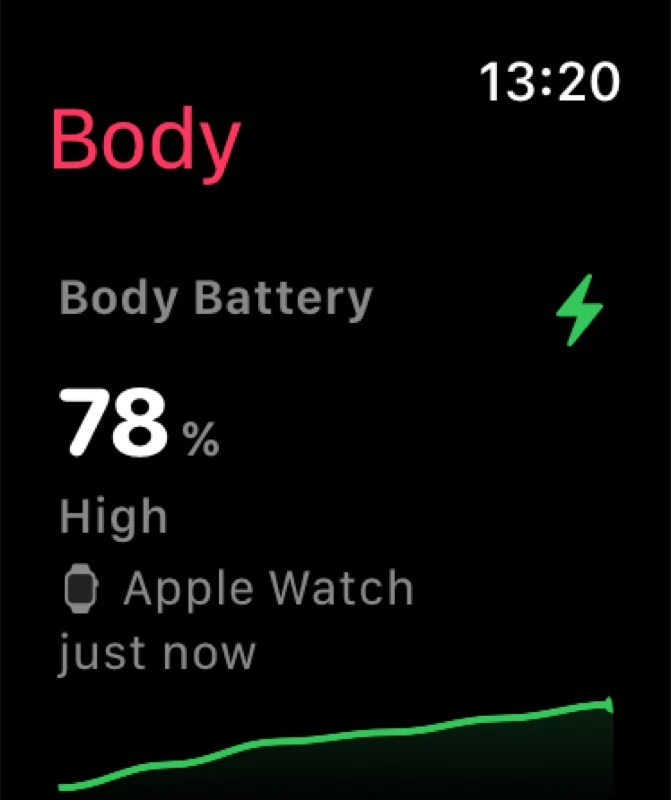
Check the number before shopping, exercise, or travel. Compare it with how you feel. If the reserve is lower than expected, move one demand or make it smaller before the day gets heavier.
When the reading needs fresh data
Pull down on the Apple Watch dashboard to refresh after new sleep or activity records arrive. The source and update time show whether the reading is current.
Body Insights adds sleep points only when a supported sleep result is available. It can still use a valid carry-over when sleep has not synced. If neither is available, the card shows No Data. An estimated state means the app used available fallback data.
Body Insights
Check your Body Battery.
See your current 0 to 100 reserve on iPhone and Apple Watch.
See my Body BatteryWhat Apple Watch gives you now
Apple Watch and Apple Health already show recovery measurements and patterns:
- Resting heart rate
- HRV
- Sleep duration and stages
- Vitals and overnight changes
- Workouts and training load
- Cardio Fitness
- Steps and activity
Apple's Training Load compares your recent workouts with your previous 28 days. Vitals shows overnight measurements against your typical range. Apple Health stores the wider record in the background.
These views answer separate questions. Vitals shows whether overnight measurements moved outside your typical range. Training Load shows how recent workout demand compares with your previous 28 days. Neither combines carry-over, sleep recharge, and daytime energy use into one current reserve.
What to look for in an Apple Watch equivalent
The closest Apple Watch equivalent reads available Apple Health records. It turns them into one current energy or readiness number.
Look for an app that:
- Shows one current reserve that is quick to check
- Uses your own recent data instead of generic athlete targets
- Shows how sleep and daytime use changed the number
- Shows where the result appears on iPhone and Apple Watch
- Marks missing or estimated data clearly
- Helps you make a practical pacing decision
Body Insights shows a current 0 to 100 reserve. The iPhone card includes the available recharge breakdown, while Apple Watch gives you the quick view. See how Body Insights calculates Body Battery for the card fields and device views. You can also compare Body Battery apps for Apple Watch by the same criteria.
How Garmin Body Battery differs
Garmin says Body Battery uses heart rate, HRV, movement, stress, rest, and sleep. It estimates your reserve around the clock. Rest and sleep can charge the number. Activity and stress drain it.
Garmin calculates Body Battery from its own device data and model. Apple uses separate views such as Vitals and Training Load. Body Insights builds its reserve from supported Apple Health records and shows its own breakdown. The numbers differ because each product starts from different data and rules.
Treat a Body Battery as a trend inside the product that calculated it. Compare today's number with your recent readings instead of trying to convert a Garmin score into a Body Insights score. See Body Battery versus recovery score if you want to choose between an all-day reserve and a morning recovery result.
Body Insights
Check your reserve before the next demand.
See your current 0 to 100 reserve, then compare it with how you feel.
See my Body Battery