Five-zone breakdown
Recovery, Easy, Tempo, Threshold, Max. Minutes per zone is the read - not an average that smears the shape away.
Workout Analysis · Apple Watch + glucose
Your Apple Watch already records the session. Body Insights reads what it captured - zones, recovery time, the glucose curve for the next six to ten hours - and tells you, in plain language, what to do tomorrow.
An average heart rate hides the story. The distribution across zones is the story.
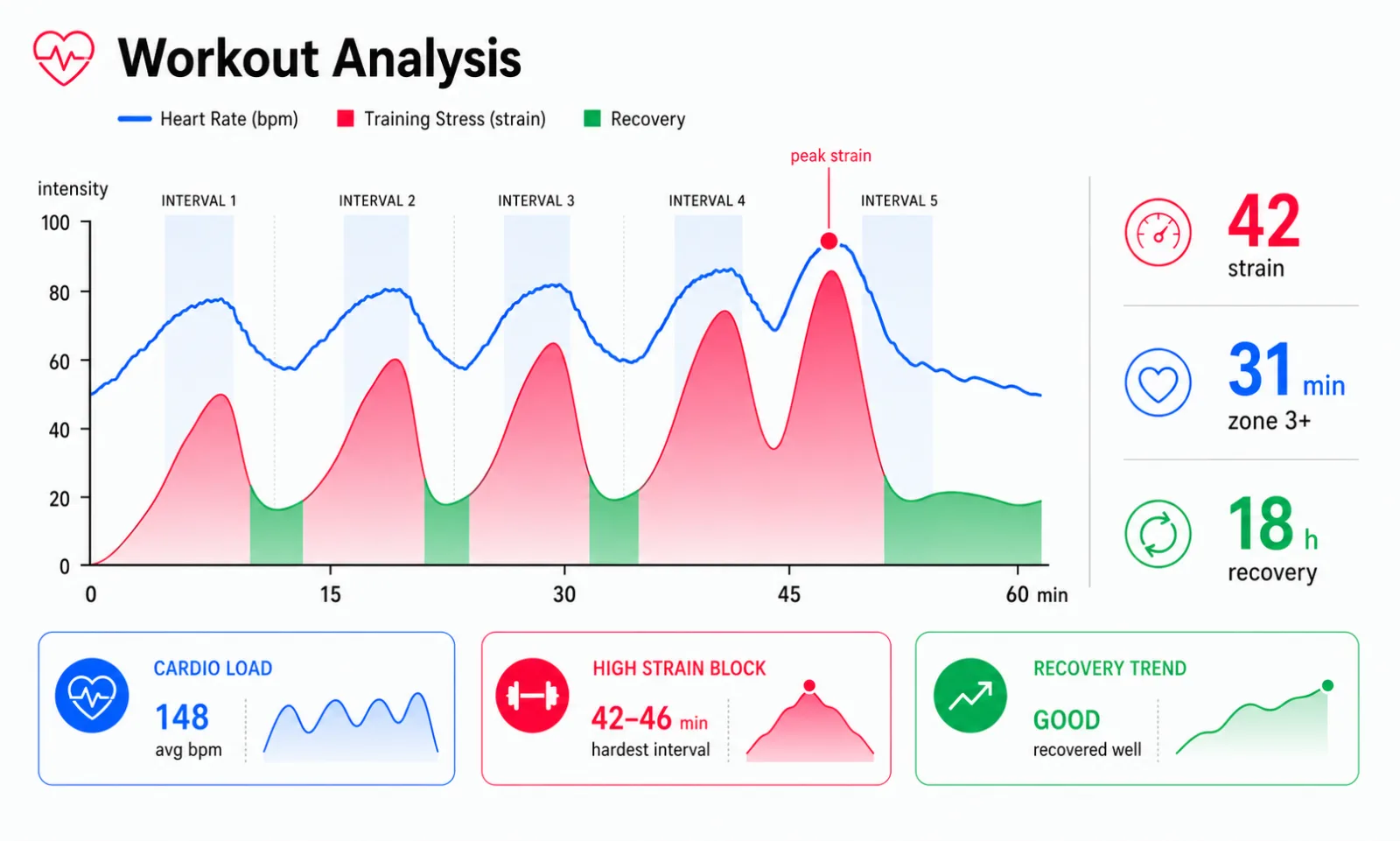
A tempo run looks different from intervals - and Body Insights tells you which one it was.
You went out for an easy run. The summary screen shows a tidy box: distance, average heart rate, calories. Tomorrow you wake up flattened. Both readings are honest - and neither one explains the other.
A workout isn't its duration. It's a distribution of effort across zones, a recovery cost that lands hours later, and - if you wear a CGM - a glucose curve that shapes how the next half-day feels. Apple Watch records most of it. Most workout apps don't translate any of it.
Body Insights does. After a session you get one sentence: "That drifted from easy into tempo for twenty minutes - plan a lighter day tomorrow." The numbers are there if you want them. The recommendation is in words.

If you wear a CGM - Stelo, Dexcom, Libre - Body Insights reads the glucose curve before, during, and for the six to ten hours after a session. Most workout apps stop at heart rate. The metabolic half of what the workout actually cost gets ignored.
You see how your glucose changed during the effort. It may stay steady, climb, or fall after exercise. A climb can mark a hard session that your liver had to fuel. A late drop may arrive after the watch stops recording. Most people don't know to look for that late-evening crash after a midday workout.
If you don't wear a CGM, this layer drops out cleanly and the zone, recovery, and load reads still work.
Most apps tell you what you did. Body Insights tells you how long it'll take to put yourself back together - and what to do until you have.
The recovery read isn't a fixed timer. It reads your average heart rate, the duration of the session, and the zones you spent your time in. A 40-minute walk and a 40-minute interval block produce very different numbers. The output is hours, not a score: "Recovered around dinner tomorrow."
If you live with chronic illness, perimenopause, or a post-illness fitness rebuild, this matters more than zone charts. The cost of yesterday's effort is what determines what today can hold.

Free for core features. No card needed.
Everything below is what an honest Apple Watch workout app should tell you. If you're shopping comparisons - Strava, Whoop, the built-in Workout app - you're in the right place.
Reads workout data from Apple Health - the same data your Apple Watch already writes there. No extra hardware. No new ecosystem.
Recovery, Easy, Tempo, Threshold, Max. Minutes per zone is the read - not an average that smears the shape away.
The full HR curve from start to finish, with the zone boundaries layered on. You can see where the session drifted.
Plain output in time, not a score. "Recovered by morning" or "Recovered around dinner tomorrow."
If you wear a CGM. Pre, during, and the six-to-ten-hour tail - including the post-workout dip most apps miss.
Cardio, strength, HIIT, flexibility - each has its own zone pattern and recovery profile. We read them differently.
One sentence after the session that ties what you did to what tomorrow should hold. Not a number. A summary.
For continuous heart rate during steady cardio, very good. For interval work where heart rate moves fast, expect a brief lag at the rising edge of each spike - the optical sensor is averaging across pulses.
For distance and pace outdoors with GPS, good. For calories, treat them as a relative trend, not a fixed truth - the model is generalized, your physiology isn't. Body Insights reads calories as one signal among several, never as the headline.
The most useful information lives in the shape: which zones, for how long, and what came afterward. A session's identity is in its distribution, not its average.

You're probably here because one of these didn't fit. So this is a direct comparison.
| Apple Workout | Strava / Whoop | Body Insights | |
|---|---|---|---|
| Heart-rate zones | Partial | Yes | Yes |
| Recovery time in hours | No | Partial | Yes |
| Glucose-response read | No | No | Yes |
| Plain-language summary | No | Partial | Yes |
| Tuned for variable baselines | No | No | Yes |
| Subscription | None | $6-30 / month | Free for core |
| Extra hardware | None | Strap or ring | None |
Strava is useful if you're racing. Its strengths are segments and social rides. Whoop serves athletes who tune training load against a healthy baseline. Body Insights serves recovery that doesn't follow a training cycle. That includes hybrid athletes who crash, fitness rebuilds after illness, and days when another Z3 session would be too much.
Three good fits.
Apple Fitness users who've outgrown the rings. The Move/Exercise/Stand frame is a great starting point and a low ceiling. If you want to know which zone your minutes lived in, or why an easy session left you wrecked, the rings can't tell you. This can.
Hybrid athletes. Lifting plus cardio plus the occasional long ride. The training load math built for one sport doesn't track what you're doing. A five-zone read across activity types does.
Return-to-fitness after illness. Long COVID, post-viral, perimenopause, an autoimmune flare that's finally settled. The rule isn't "push harder" - it's "stay under the line that triggers a crash." A recovery-hours read that updates per session is the single most useful number for this.

If you want a stopwatch with a calorie count, Apple Workout covers it. If you want to know what the session did - zones, recovery hours, glucose tail - that's the gap we built into.
Continuous optical heart rate during workouts, written to Apple Health. We read the stream and bin it into Recovery, Easy, Tempo, Threshold, Max.
Usually the session drifted out of easy. Or sleep was short. Or pre-workout glucose was low. We read all three and tell you which tipped the balance.
Yes. Strength shows a different zone shape - short bursts with long valleys - and the recovery read is tuned for that pattern as well as steady cardio.
No. Without one, you still get zones, recovery hours, and load. With one, you also get the glucose-response read and post-workout dip alerts.
Free for core workout features. Premium adds glucose fusion and deeper training-load analytics. No card needed to start.
On-device. No account. No subscription required. No data sold. Ever.

Free for core insights. Premium adds glucose-response fusion and deeper training-load analytics.