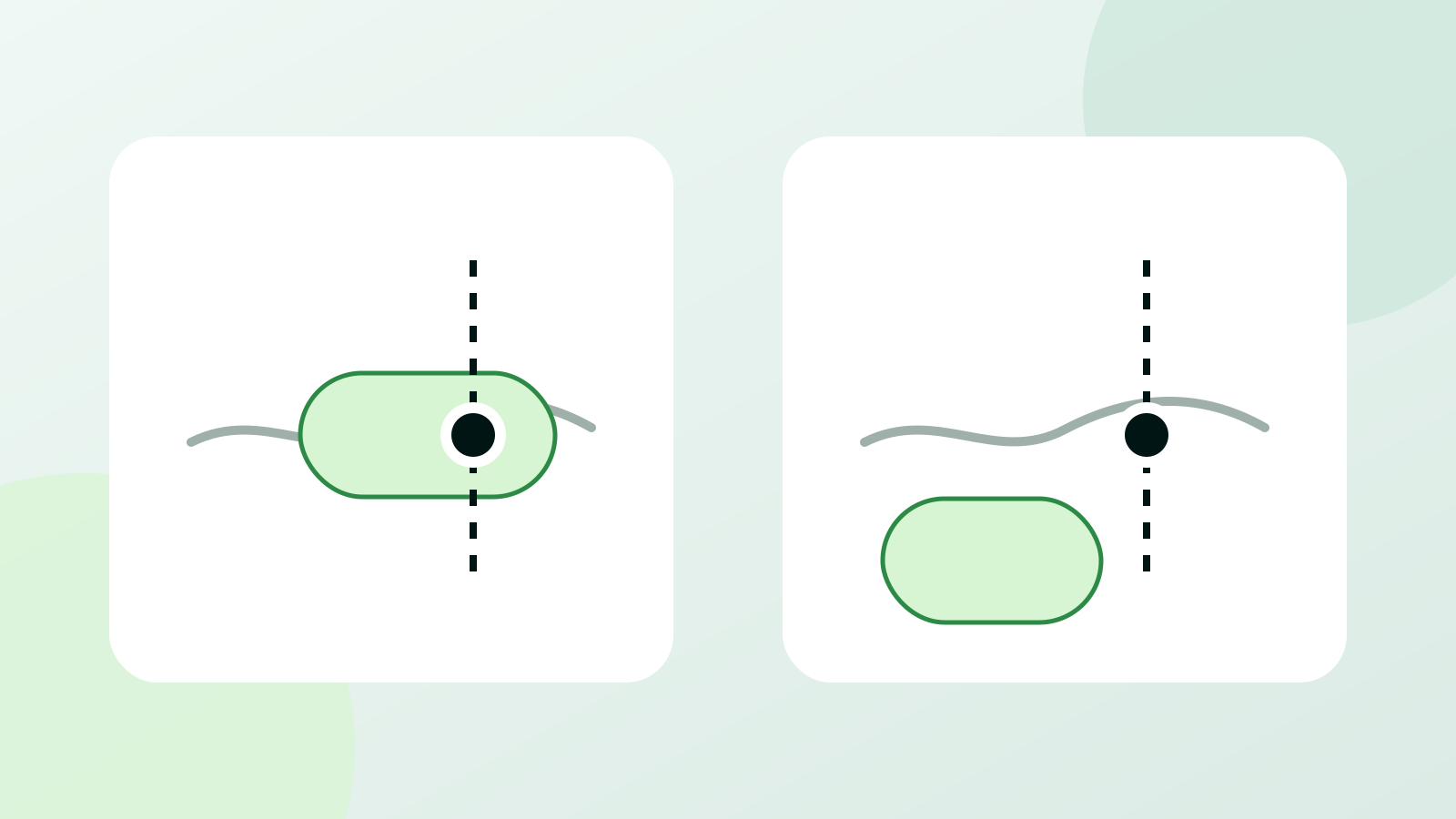
Your personal health baseline is the usual range and pattern in your own Apple Watch readings. It is not one perfect number. Each metric needs its own reference.
Use a baseline to ask whether today's reading has moved away from your usual pattern. You can apply this to HRV, resting heart rate, wrist temperature, sleep, and activity. Before you act, check whether the change is valid, repeated, and supported by other readings.
Body Insights
See what changed in your Apple Health data.
Body Insights reads Apple Health data from Apple Watch and translates it into energy, recovery, and pacing guidance.
Read my health patternWhat a personal health baseline shows
A baseline shows the level you tend to return to. It also shows how much your readings usually move. A stable resting heart rate might sit in a narrow band. HRV may spread across a wider band even when nothing important has changed.
The comparison must also be fair. Overnight HRV and a daytime HRV sample are not interchangeable. A resting heart rate during sleep differs from one taken after coffee or stairs. Compare the same metric, source, and setting whenever possible.
This is especially important for HRV. A systematic review of 44 studies and 21,438 adults found large differences between people. Recording and processing methods also differed. A generic chart can describe a population. Your repeated measurements show whether today is unusual for you.
Why the same number can mean two different things
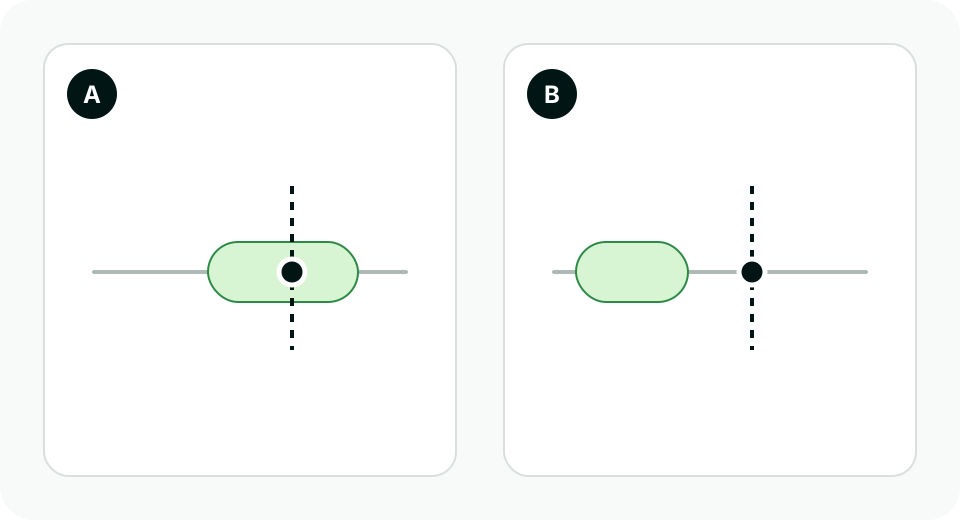
Imagine that two people record an HRV value of 42 milliseconds. Person A usually sits between 35 and 50 ms, so 42 is ordinary. Person B usually sits between 60 and 80 ms, so 42 is a clear change. The number is identical. Its relationship to each person's history is not.
That change still needs context. Person B may have slept poorly or taken a late measurement. Travel, medicine, hard exercise, or illness may also matter. The baseline tells you that something moved.
Population ranges still have a job. They show how a value compares with a broad group or clinical reference. A personal baseline asks whether the value is normal for your body right now.
Different metrics need different baseline windows
There is no single answer to "How many days make a baseline?" The signal and the question decide the window.
Apple's own features show the difference. Vitals needs seven nights to establish typical overnight ranges. Wrist Temperature needs about five nights before it shows changes from your baseline. Training Load compares the last seven days with the previous 28 days. These are three baseline designs for three different jobs.
| Reading or feature | Reference it uses | Question it answers |
|---|---|---|
| Overnight Vitals | A typical range established after seven nights | Was last night high, typical, or low for you? |
| Wrist temperature | About five nights | Did last night move from your baseline? |
| Training Load | The latest seven days compared with the previous 28 days | Is recent workout demand below or above your longer pattern? |
| Body Insights Stress Balance | Your HRV history and today's available hours | Did today lean strained, mixed, or relaxed? |
A baseline also needs enough valid data. Two nights of watch use are not the same as seven complete nights. A new watch or loose fit can weaken the data. Charging gaps, travel, and major routine changes can do the same. Keep collecting comparable readings until the reference is more stable.
Read each Apple Watch signal on its own terms
HRV: compare the method and the moment
HRV is the variation in time between heartbeats. Recording length and method affect the value. Body position, time of day, and recent activity also matter. Compare readings within the same Body Insights view and under similar conditions. Trust repeated readings more than one isolated sample.
The direction matters more when it continues. One low value can be noise or a real short event. Several lower readings show a stronger shift. The case gets stronger when resting heart rate, sleep, or symptoms move too.
Resting heart rate: check the level and the drift
Resting heart rate is easier to understand as a trend than as a single daily score. Start with your usual level. Then look at how far today's value moved and how many days the change has lasted.
A small rise that ends tomorrow differs from one that builds for a week. First check the measurement setting. Then note recent sleep, activity, travel, medicine, alcohol, pain, or illness.
Respiratory rate and wrist temperature: keep the overnight context
These readings work best when your watch captures them during sleep in similar conditions. Apple shows wrist temperature as a change from your baseline. Read the relative movement first, then look for the cause.
Look for agreement across overnight metrics. Apple notes that medicine, elevation, alcohol, and illness can affect Vitals. One outlier is weak evidence. Several outliers on the same night make a stronger pattern.
Sleep and activity: compare like periods
Sleep duration needs recent sleep context. Six hours after several eight-hour nights is a clear shift. Six hours in a long-standing pattern is not. Sleep timing and interruptions add more information. So does how you feel the next day.
Activity needs a longer frame. One busy day may be ordinary inside a busy month. The same day can be a large jump after a quiet month. That is why Training Load compares a recent week with the four weeks before it.
Five checks before you act on a change
- Check the measurement. Confirm the watch was worn correctly and that the data covers the period you think it does.
- Compare like with like. Use the same metric, device, measurement method, and time of day when possible.
- Check persistence. See whether the change appears again across the next comparable readings.
- Look for a cluster. Several metrics moving together tell you more than one number alone.
- Add the missing context. Note symptoms and medicine changes. Add travel, alcohol, pain, hard activity, cycle phase, or a disrupted routine when relevant.
This order reduces two common mistakes. You are less likely to ignore a real change because the raw value still fits a population range. You are also less likely to rebuild your day around one noisy sample.
A worked example: one low reading versus a changed pattern
Suppose your HRV is lower than your usual range this morning.
| What you see | How much confidence it deserves | A proportionate response |
|---|---|---|
| HRV is low once, but wear time was short | Low confidence | Check the data and wait for the next comparable reading |
| HRV is low for two mornings, while other readings stay usual | Moderate confidence that HRV changed | Keep the next day flexible and watch the direction |
| Low HRV, higher resting heart rate, and worse sleep | Higher confidence in a wider change | Reduce avoidable demand and record what changed |
None of these rows names a cause. Confidence grows when the measurement is valid and the change persists. Other signals can support it.
How Body Insights turns your baseline into Stress Balance
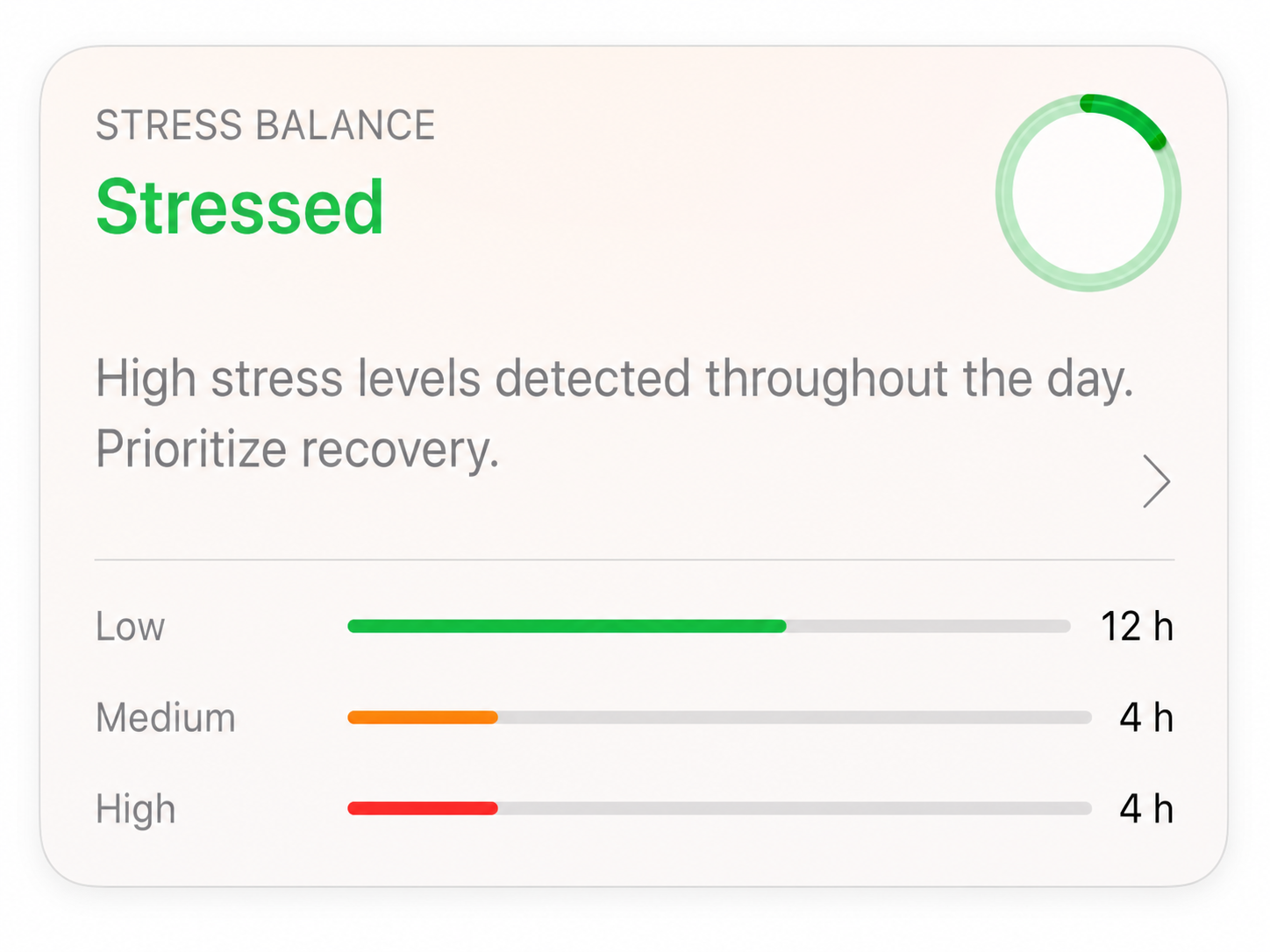
Body Insights Stress Balance reads HRV records available in Apple Health. It builds a personal reference from usable recent history. It then groups today's readings by hour and compares each hour with your range.
The card shows one daily label. It can be Very Stressed, Stressed, Balanced, Relaxed, or Very Relaxed. The card also shows available hours at low, medium, and high stress levels. Missing hours stay missing.
The screenshot above shows a Stressed result and a recovery recommendation. It also shows the available hours in each level. The result describes the physiological pattern. You still add the context, such as illness, poor sleep, pain, exercise, or a demanding day.
Other Body Insights features use the history that fits their job. Sleep, readiness, energy, and illness patterns each use their own window. One unusual day should not redefine your normal. A lasting change should not be compared forever with an old version of you.
Body Insights treats personal baselines as a method. You use the output. That may be a daily stress label, recovery read, sleep result, energy view, or change alert.
When a baseline has genuinely moved
Your usual pattern can change. A new medicine, long illness, pregnancy, or menopause can move it. So can a sustained training block, a new schedule, or a long change in activity. A useful baseline adapts as valid data arrives.
Do not confuse adaptation with instant normalization. One hard week should not make a poor reading meaningless. Look for a sustained new level across fair comparisons. Note the date of a life or treatment change. This gives you a clean before-and-after record.
Use the personal baseline for daily decisions. Use clinical ranges when the question needs a broader health frame. If a change persists or comes with concerning symptoms, take the trend to a health professional. Include dates, symptoms, medicine, and routine changes. The history is more useful than one screenshot.
Related reading
- How Stress Balance is calculated
- Stress monitoring with Apple Watch
- What HRV means with chronic illness
- How to spot overdoing it before a crash
Body Insights
See what changed in your Apple Health data.
Body Insights reads the Apple Watch data you already have and turns it into a plain daily read on energy, recovery, and pacing.
Read my health pattern