
The best stress app for Apple Watch depends on the decision you want to make. Start with Body Insights for a plain Stress Balance view and a separate daily capacity check. Use Apple Mindfulness and Health for built-in mood logs and health records. Choose a focused monitor for HRV trends or a broader coach for recovery and training.
Apple Watch does not include one native stress score. It records useful inputs, such as HRV, heart rate, sleep, workouts, and mood logs. Third-party apps turn those records into different views.
Body Insights
See what changed in your Apple Health data.
Body Insights reads Apple Health data from Apple Watch and translates it into energy, recovery, and pacing guidance.
Read my health patternBest stress apps for Apple Watch
This table compares each app by the same four points.
| App | Main views | Inputs | Job |
|---|---|---|---|
| Body Insights | Stress Balance; capacity | HRV and Apple Health | Plan the day |
| Apple Mindfulness and Health | Mood logs and records | Mood and Watch data | Use built-in tools |
| StressWatch | Stress trends | HRV and heart rate | Monitor habits |
| Stress Monitor for Watch | Stress charts | Watch heart data | Review stress data |
| Welltory | Stress and energy | HRV and heart rate | Explore details |
| Bevel | Broad health view | Health and workout data | Use one health coach |
| Athlytic | Recovery and effort | Heart and training data | Guide training |
1. Body Insights: stress and daily capacity
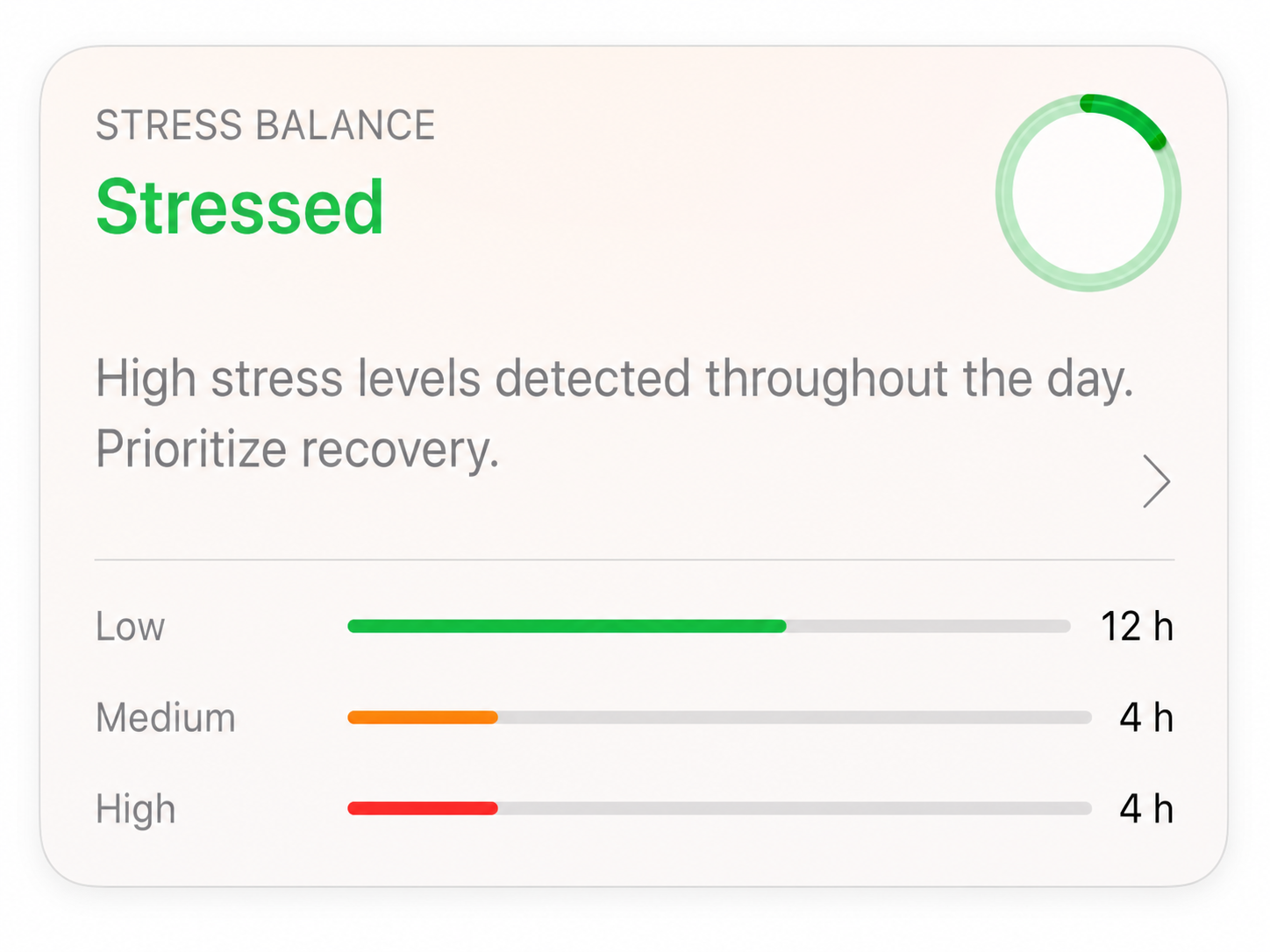
Body Insights is the clearest fit when a stress reading needs to guide today’s plan.
Its Stress Balance feature compares usable HRV hours with your personal range. It labels the day Very Stressed, Stressed, Balanced, Relaxed, or Very Relaxed. It also shows the number of hours in the high, medium, and low ranges.
Today’s Capacity is a separate view. It combines recovery context into one of four labels: Rest, Take It Easy, Steady Day, or Ready for More. This helps you move from data to a practical plan without treating stress and capacity as the same measure.
2. Apple Mindfulness and Health: built-in mood logs
Apple’s native tools do not calculate an automatic stress score. The State of Mind feature in Mindfulness lets you record how you feel. Apple Health stores that log with data such as sleep, exercise, daylight, heart rate, and HRV.
This is a useful starting point if you want a private mood record and do not need an interpreted stress reading.
3. StressWatch: focused HRV trends
StressWatch centers its experience on stress monitoring. It uses Apple Health data, including HRV and resting heart rate, to show trends and habit feedback.
It suits people who want a stress-first app with frequent watch-based feedback. The focus is narrower than a full recovery or training coach.
4. Stress Monitor for Watch: stress and capacity charts
Stress Monitor for Watch processes Apple Watch heart data and presents stress and capacity views. It offers several charts for people who want more detail than one daily label.
Choose it when the dashboard itself is useful and you want a dedicated stress monitor on Apple Watch.
5. Welltory: detailed heart-data insights
Welltory combines HRV, heart rate, stress, energy, and lifestyle context. Its readings cover more than daily stress, so there is more to explore and interpret.
It fits people who want detailed heart-data analysis and are comfortable with a denser app.
6. Bevel: broad health coaching
Bevel puts stress beside recovery, sleep, strain, and health coaching. It treats stress as one part of a wider daily health view.
Consider it when you want one app for several health and fitness areas, not a focused stress tool.
7. Athlytic: training and recovery
Athlytic uses Apple Watch and Apple Health data for recovery, exertion, and training guidance. HRV and resting heart rate help place recent workouts in context.
It is strongest when exercise drives the decision. People who do not train often may not need its athlete-focused views.
Which stress app should you choose?
| Your main question | Start with |
|---|---|
| How stressed has my day been, and what can I handle today? | Body Insights |
| How have I felt over time? | Apple Mindfulness and Health |
| What do my HRV stress trends show? | StressWatch |
| Can I see several stress and capacity charts? | Stress Monitor for Watch |
| Can I explore detailed HRV and heart-data readings? | Welltory |
| Can one coach cover stress, sleep, recovery, and strain? | Bevel |
| How should recovery affect my training? | Athlytic |
For most people who want an Apple Watch stress reading that leads to a daily action, start with Body Insights. Stress Balance explains the pattern. Today’s Capacity gives a separate plan for the day. If you only want built-in mood logging, start with Apple’s tools. Add a specialist app when you need its specific charts or training workflow.
Related reading
- Does Apple Watch have a stress score?
- How stress score is calculated
- HRV, stress, and sleep
- Apple Watch readiness score
- Best recovery apps for Apple Watch
- Does Apple Watch have Body Battery?
Body Insights
See what changed in your Apple Health data.
Body Insights reads the Apple Watch data you already have and turns it into a plain daily read on energy, recovery, and pacing.
Read my health pattern