
Apple Watch records data that can add stress context, and its Mindfulness app lets you log your state of mind. Apps such as Body Insights can read permitted Apple Health data and turn it into a separate stress view.
Body Insights
See what changed in your Apple Health data.
Body Insights reads Apple Health data from Apple Watch and translates it into energy, recovery, and pacing guidance.
Read my health patternWhat does Apple Watch show instead?
Apple has native features for sleep, heart rate, heart rhythm, activity, and mood. It also has Sleep Score.
The closest native feature is State of Mind. You record how you feel in the Mindfulness app. Apple Health can then show those logs beside factors such as sleep, exercise, daylight, and mindful minutes.
Apple Watch also records inputs used by third-party stress apps:
- Heart-rate variability (HRV)
- Resting heart rate
- Sleep duration and interruptions
- Workouts and activity
- Daytime heart-rate patterns
- State of Mind logs
These records describe different parts of the day.
Why do stress apps use HRV?
HRV is the change in time between heartbeats. Stress apps often compare it with your usual values because it can move when the body is under more or less strain.
Sleep, illness, alcohol, heat, exercise, and emotional stress can all affect HRV. That makes a single reading hard to interpret. A repeated pattern against your own range is more useful than a comparison with someone else’s number.
How Body Insights calculates Stress Balance
Body Insights keeps its stress reading separate from its recovery and capacity guidance.
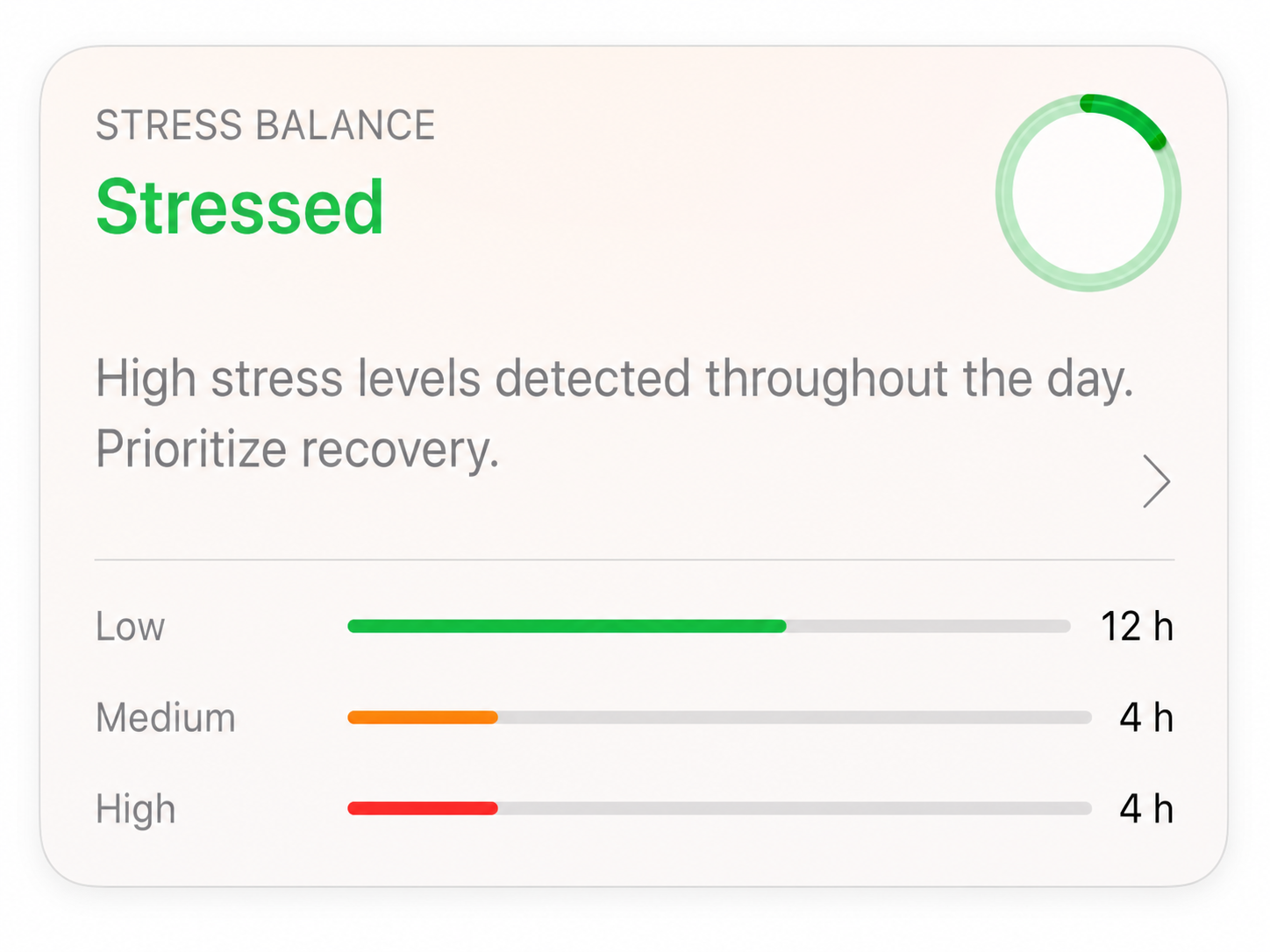
Apple Watch records HRV samples, and Apple Health stores the data you allow it to share. Body Insights groups usable HRV samples by hour and calculates an average for each hour. It compares those hourly values with your personal range, then counts the hours in the high, medium, and low stress bands.
The result is Stress Balance. It labels the day Very Stressed, Stressed, Balanced, Relaxed, or Very Relaxed. The same card shows the high-, medium-, and low-hour breakdown, so you can see what supports the label.
How to read stress data in the morning
Compare each measure with your own usual pattern.
| Check | Useful comparison | What it can change |
|---|---|---|
| Stress Balance | Today’s category and the pattern across recent days | Decide whether to review the hourly breakdown |
| HRV | Your recent personal range | Add context about strain or recovery |
| Resting heart rate | Your usual resting value | Notice when the day starts differently |
| Sleep | Your normal duration and continuity | Reduce the plan after a poor night |
| Symptoms and mood | How you feel now | Use the more cautious plan when data and symptoms disagree |
The next action can be small: shorten a workout, leave more space between meetings, take a quiet break, or protect sleep that night. Look for repeatable patterns.
When is a third-party stress app useful?
Some apps focus on frequent HRV stress trends. Others combine stress with sleep, recovery, or training. Body Insights separates its HRV-based Stress Balance from Today’s Capacity, which makes it useful when you want both the pattern and a plain plan for the day.
Related reading
- Best stress apps for Apple Watch
- How stress score is calculated
- HRV, stress, and sleep
- Apple Watch readiness score
- Apple Watch recovery score
- Does Apple Watch have Body Battery?
Body Insights
See what changed in your Apple Health data.
Body Insights reads the Apple Watch data you already have and turns it into a plain daily read on energy, recovery, and pacing.
Read my health pattern