

Apple Watch calculates cardio fitness (VO2 max) from heart rate, GPS pace, and elevation change during outdoor walks, runs, and hikes. Body Insights reads workout heart rate and pace from indoor and outdoor workouts to show VO2 max trends when Apple Health has no reading.
Body Insights
See what changed in your Apple Health data.
Body Insights reads Apple Health data from Apple Watch and translates it into energy, recovery, and pacing guidance.
Read my health patternHow Apple Watch calculates Cardio Fitness from workout data
Apple Watch records a Cardio Fitness estimate only during an Outdoor Walk, Outdoor Run, or Hiking workout. Indoor treadmill runs do not count. Indoor walks do not count. Cycling and swimming do not count either.
You can read the full rules in Apple Support on Cardio Fitness levels and in the Apple Healthcare white paper on VO2 max.
Estimates are for users aged 20 and older. Each cardio fitness score pairs your heart rate with pace and elevation work along the route.
The inputs the watch uses
The watch reads pulse data using the optical heart sensor on its back. It pairs that heart rate with motion and GPS speed from your workout. It also checks elevation changes along the route.
It then adds your Health profile fields: age, biological sex, height, and weight. It also accounts for heart-rate-limiting medications logged in Apple Health.
Medications like beta-blockers or calcium channel blockers limit max heart rate. If they are missing from your Health profile, the watch estimate can read low. Flat routes, strong GPS, and a snug watch band give cleaner readings.
How to find VO2 max in Apple Health
Your Cardio Fitness chart lives in Apple Health on iPhone rather than on Apple Watch itself. The watch records the workout, and your iPhone stores the VO2 max trend.
To find your VO2 max on Apple iPhone, open the Health app, tap Browse, tap Heart, and select Cardio Fitness. New points appear after qualifying Outdoor Walk, Outdoor Run, or Hiking workouts.
Apple Watch Cardio Fitness accuracy next to a lab test
Apple Watch Cardio Fitness accuracy is better for long-term trends than single lab-grade scores. A peer-reviewed study tested this directly in 2025.
Lambe et al. 2025 in PLoS One tested 30 adults. Each person wore an Apple Watch for 5 to 10 days alongside laboratory exercise testing.
The watch underestimated lab VO2 max by 6.07 mL/kg/min on average (95% confidence interval: 3.77 to 8.38 mL/kg/min). Mean Absolute Error was 6.92 mL/kg/min, and Mean Absolute Percentage Error was 13.31%. Limits of agreement ran from -6.11 to 18.26 mL/kg/min.
A single reading can sit several points away from a lab test. Repeat outdoor workouts under calm, similar conditions still show whether your fitness trends up or down. For VO2 max by age on Apple Watch, compare against your own baseline first and age tables second.
Why readings look low or stop
Apple Watch Cardio Fitness low readings and missing data usually come down to workout type, GPS signal, or heart rate conditions.
Why Apple Watch shows no Cardio Fitness data
Indoor runs and indoor walks never update the Cardio Fitness chart. Short workouts, weak GPS locks, or a loose strap can also skip a reading.
It often takes several outdoor walks or runs on fairly flat ground before the first number appears. Steep trails or broken GPS can also explain why Apple Watch misses readings even when you exercise regularly.
Why VO2 max looks low on Apple Watch
Warm weather raises heart rate at the same speed. Hills and heavy fatigue do the same.
When VO2 max looks low on Apple Watch, check the conditions on your last few routes first. Steady outdoor efforts with solid GPS give fairer results. Unlogged beta-blockers or calcium channel blockers can also skew the estimate low.
The 2025 study found Apple Watch reads 6.07 mL/kg/min lower than lab tests on average. One low point on the chart does not prove your real aerobic fitness dropped overnight.
Filling the gaps across indoor and outdoor workouts
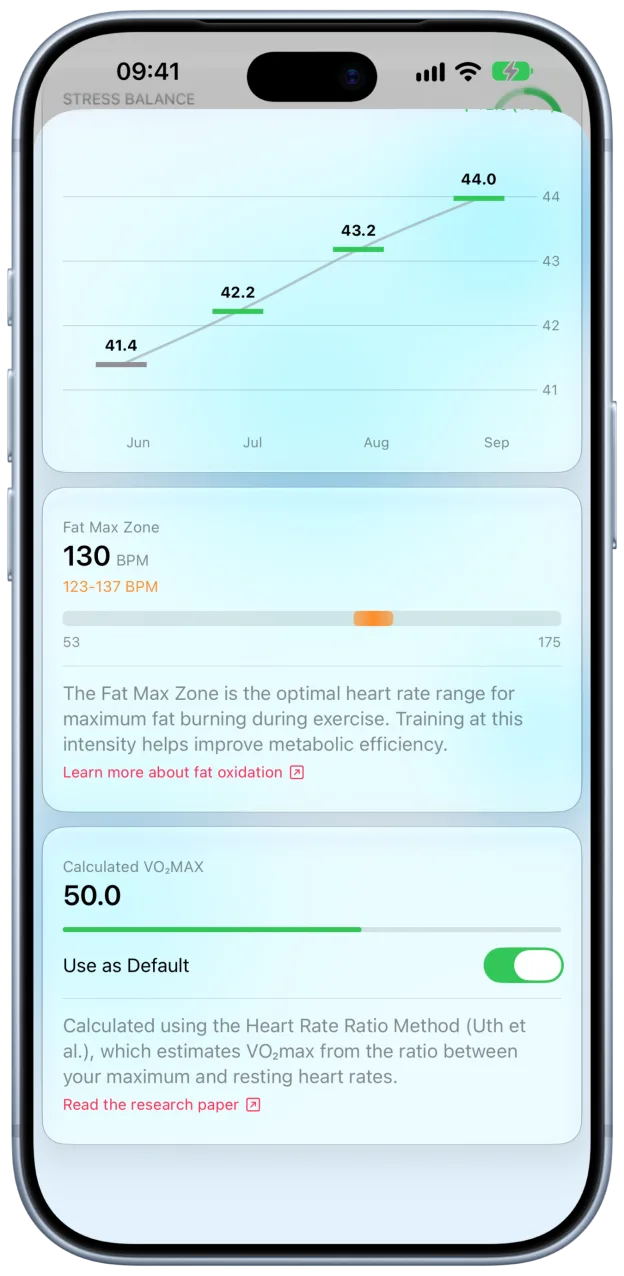
Apple Health updates Cardio Fitness only after outdoor walks, runs, and hikes. People who train indoors on treadmills or bikes often end up with empty charts all winter.
Body Insights reads Apple Watch workout heart rate and pace across both indoor and outdoor sessions. It estimates VO2 max trends even when Apple Health skips readings.
If half your training stays indoors, you still see how fitness moves over time without switching every session outdoors.
Frequently asked questions
How does Apple Watch measure cardio fitness on a hike?
It uses the same inputs as an outdoor walk or run: heart rate, GPS speed, elevation gain, plus your age, sex, height, and weight in Health. Hiking is one of the three supported workout types.
Why does my treadmill run not update Cardio Fitness?
Apple Watch generates Cardio Fitness VO2 max readings only from Outdoor Walk, Outdoor Run, and Hiking sessions. Indoor treadmill runs do not trigger an estimate in Apple Health.
How long until the first reading appears?
Expect several outdoor sessions on relatively flat terrain with clean GPS and a snug watch band. Short stops, weak GPS, or loose straps delay the first estimate.
Is one low reading a real drop in fitness?
Usually not. Heat, hills, poor sleep, or fatigue push heart rate higher for a given pace. Because Apple Watch also runs slightly below lab scores on average, watch multi-week trends rather than one workout.
Body Insights
See what changed in your Apple Health data.
Body Insights reads the Apple Watch data you already have and turns it into a plain daily read on energy, recovery, and pacing.
Read my health pattern