
Each app below went through the same checks, drawn from its App Store listing and official pages. The full method, sources and check date are at the end of this article.
Quick picks by pacing job
Here are our picks by job, from the 7 apps we reviewed.
| Job | App | Why |
|---|---|---|
| Daily guidance, check-ins and patterns | Body Insights | Coach guidance, daily state, check-ins. |
| A wrist notice above your heart rate limit, plus a daily reserve | CoPace | Live Shield notices sit beside a daily reserve and evening check-in. |
| Plan tasks; monitor one activity | Metered | Spoon budgets combine with timed reminders and session BPM. |
| Set limits; review symptoms | Trackuility | Thresholds, calendar notes and PEM reports. |
| Glance at personal limits | WatchME | Face complications show your configured threshold states. |
Body Insights
Plan today around the energy you have.
Body Insights reads Apple Health data from Apple Watch and translates it into energy, recovery, and pacing guidance.
Get my pacing readPacing apps for Apple Watch compared: limits, budgets and records
| App | Activity decision | Daily and later review | Watch and phone conditions | Cost |
|---|---|---|---|---|
| Body Insights | Condition-aware pacing guidance from your daily state. | Check-ins, Body Battery and activity-pattern review. | Core Watch views work alone; detailed review on iPhone. | Free download. Chronic Condition mode and the daily check-in on iPhone are free. |
| CoPace | Shield gives moving or still notices. | Reserve, morning guidance and evening check-in. | iPhone analysis; optional Watch workout session. | Core free; Pro US $4.99/month or $44.99/year. |
| Metered | Timers and BPM for one activity. | Task budget and logged outcomes. | iPhone planning; Watch session monitoring. | Planning free; Plus US $29.99 lifetime. |
| Trackuility | Watch notices for configured limits. | Energy budget, symptom calendar and PEM reports. | HealthKit; Watch background checks can be delayed. | Free download in the US. |
| Pacebase | Watch widget shows threshold-minute budget. | Body Score, symptom and activity records. | Apple Health inputs; iPhone and Watch widget. | Subscription US $8.99/month after trial. |
| HeartWatch | Background and separate workout alerts. | Journal, metric trends and exports. | iPhone with Health; face complication for background alerts. | US $8.99 once; no subscription. |
| WatchME | Periodic notices for personal limits. | Daily threshold states on phone and Watch. | Active-face complication required for background alerts. | Free download in the US. |
Sources: CoPace, Metered, Trackuility, Pacebase, HeartWatch, Body Insights and WatchME, checked 2026-10-22.
What each pacing app for Apple Watch does and does not do
Body Insights: guide daily pacing and review activity patterns
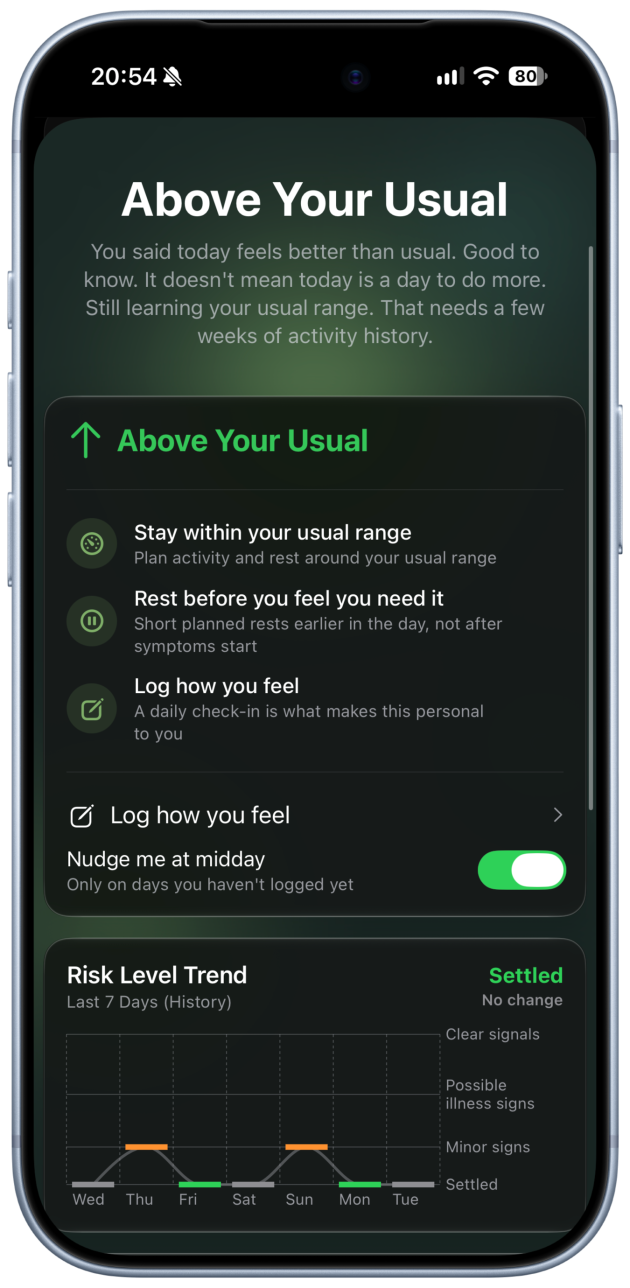
Body Insights has a Manage a Chronic Condition module for daily pacing decisions. It compares Apple Health readings and your check-ins with your own usual pattern. Coach guidance changes with your answer about feeling worse after activity.
Does:
- Adapts Coach guidance to how you feel after activity.
- Shows a daily state from your health signals, recent activity and check-ins.
- Records daily check-ins on phone or Watch. You can add custom symptom tags on iPhone.
- Looks for busier days followed by harder days in your completed check-ins.
- Keeps recovery and Body Battery views alongside movement and light-activity heart-rate context.
Does not:
- Show a learned personal step ceiling before enough usable activity history exists.
- Use heart-rate movement comparisons when you report a recent heart-medication change.
On iPhone, open Settings > Modules > Manage a Chronic Condition. In setup, answer whether activity leaves you feeling worse later. The Coach uses that answer alongside your current state for its daily guidance.
Tap the Coach card to review the readings behind that guidance. Supporting signals include movement, light-activity heart rate and a personal step ceiling. The ceiling describes your history.
Use "Log how you feel" for the daily check-in. Pattern review needs enough logged history; skipped days do not count as feeling fine. A missing comparison shows a learning or no-data state.
On Watch, enable the mode through iPhone before sending check-ins. Offline records queue for transfer to the phone.
CoPace: connect wrist notices with daily reserve
CoPace pairs live pulse alerts with a daily effort budget. Shield is its live Apple Watch mode.
Energy Reserve is your daily effort budget, shown in minutes. You set its size; Morning Energy adjusts it for the day. Time above your chosen heart-rate limit draws it down.
Does:
- Shows time spent above your pacing threshold and the reserve left.
- Gives morning energy and recovery guidance from your recent data.
- Uses separate Shield states for moving and staying still above the threshold.
- Records an evening feeling slider with optional notes and tags.
- Exports your data through Settings > Privacy & Data > Download My Data.
Does not:
- Give live Shield notices without running a Watch workout session.
- Preserve background HRV collection while that workout runs.
- Offer live monitoring at the same battery cost as passive mode.
- Include adaptive personalisation in the free Core tier.
The live Shield mode runs as a Watch workout. Use it during a task when you want frequent readings and wrist notices. Above your chosen limit, it shows "Slow Down" while moving or "Sit Down" while still. Standing still can trigger the second state.
With Shield off, CoPace still updates Energy Reserve from background readings. It marks effort minutes as approximate because it has fewer readings. After a task, check how much of the day's budget is used. In the evening, record how your body felt in the check-in.
Core includes Shield and the check-in. Pro adds personalisation for US $4.99/month or $44.99/year.
Metered: budget tasks and monitor activity sessions
Metered turns a day into planned activities with spoon costs. You can plan today and tomorrow, then mark what you did from the Watch.
Does:
- Assigns costs to physical, cognitive, social and sensory activities.
- Shows the budget and activity actions on Apple Watch.
- Starts a time reminder from a planned activity.
- Monitors BPM on Watch during an activity with a pacing alert.
- Adds Morning Signal, reports and CSV export with Metered+.
Does not:
- Extend session BPM monitoring across the whole day.
- Run two live BPM activities at once.
- Include automatic personalised budget reasoning or learned costs in the free tier.
- Include reports and CSV export without Metered+.
In the Activity Editor, add a time limit or pacing alert before starting the task. A one-off timer is separate from Watch BPM monitoring. Record activities and outcomes; copying a previous plan reduces repeat entry.
Free planning uses a manual budget. Metered+ is US $29.99 for lifetime access.
Trackuility: set limits and review symptom patterns
Trackuility lets you define the limits you want to watch. Its calendar connects earlier activity with symptoms and notes you enter.
Does:
- Sets a daily energy budget and pacing profile.
- Compares metrics against your limits across several time windows.
- Sends threshold notices through the Watch app.
- Saves symptoms and notes for a chosen day.
- Builds PEM reports with health information from before crash days.
Does not:
- Choose your personal thresholds for you; setup and adjustment are manual.
- Export app data.
- Send threshold notices on iPhone.
- Guarantee immediate notices; background limits and cooldowns can delay them.
Set the metrics and time windows you want to follow. Then enable notifications in the Watch app. A face complication supports more frequent checks.
Background access stops while the Watch is locked. Symptoms and notes need entry; HealthKit supplies the measured data. Trackuility is free to download in the US.
Pacebase: follow a heart-rate budget and record symptoms
Pacebase expresses Body Budget as time above a personal heart-rate threshold. Its Watch widget lets you check that budget during the day.
Does:
- Shows threshold minutes in Body Budget.
- Compares daily recovery signals with your own history for Body Score.
- Displays the budget in an Apple Watch widget.
- Records symptoms through an evening check-in that informs Body Score.
- Logs activities and shows their impact on Body Budget.
Does not:
- Provide continued access after the trial without a subscription.
Set the threshold during setup, use the widget to view the budget, and log an activity to see its budget impact. Evening symptoms add your own account of the day to the measured signals. Pacebase costs US $8.99/month.
HeartWatch: combine heart-rate alerts with a journal
HeartWatch connects heart-rate notices with notes and longer trends. Open a notice to review nearby readings or add a note about the activity.
Does:
- Sets high and low heart-rate alerts on Watch.
- Offers separate custom zones and alerts for workouts.
- Records daily notes and measurements from Watch or iPhone.
- Displays heart-rate and HRV trends.
- Exports health metrics and workouts.
Does not:
- Run its phone analysis without an iPhone with the Health app.
- Provide background alerts without a face complication.
- Check every moment in background mode; Watch scheduling controls updates.
- Apply the daily active-alert settings to exercise; workouts have separate settings.
Set high and low limits under Watch Settings > Alerts. For background alerts, open HeartWatch after you put on the Watch. Keep a complication on its face. You can add journal context when needed. HeartWatch costs US $8.99 once, with no subscription.
WatchME: see personal limits on the watch face
WatchME puts your configured limits on a Watch face. It shows daily measures as limit states during ordinary tasks.
Does:
- Sets personal limits for heart rate, stand time, steps and distance.
- Shows nominal, caution, warning and critical states.
- Displays status on iPhone and Watch through HealthKit.
- Adds face complications and background threshold notices.
Does not:
- Send background alerts without a complication on the active Watch face.
- Send instant alerts; it checks at intervals during the day.
Set your limits, then add a complication to the face you use. Background notices depend on that active face. The daily measures come from HealthKit after setup. WatchME is free to download in the US.
How to choose the right pacing app for Apple Watch for you
1
Body Insights pairs daily pacing advice with check-ins. It also reviews patterns after activity. Metered plans tasks with spoon costs. Pacebase shows a threshold-minute budget.
2
For notices during a task, CoPace Shield runs a Watch workout. Metered measures BPM for one activity. Trackuility and WatchME give background notices for limits you set. HeartWatch has background and workout alerts.
3
For later review, Trackuility has a symptom calendar. HeartWatch adds a journal. Body Insights reviews check-ins after busier days. Pacebase records symptoms and activities.
We would pair a wrist notice from CoPace or Trackuility with Body Insights for daily guidance and patterns, and we would pick Metered if you plan in spoons.
Frequently asked questions
Which pacing apps for Apple Watch are free?
Trackuility and WatchME are free to download in the US. CoPace Core includes Shield and evening check-ins. Metered offers free manual planning, while Plus adds personalised budgets and reports.
Body Insights is a free download. Chronic Condition mode and the daily check-in on iPhone are free.
Which apps monitor heart rate during an activity?
Metered measures BPM during one chosen activity. CoPace Shield runs live checks as a Watch workout. HeartWatch has separate workout alerts. Trackuility and WatchME use background checks for their notices.
Can a pacing app account for standing still?
CoPace distinguishes a raised heart rate while still from one while moving. Shield uses the "Sit Down" state for stillness and "Slow Down" for movement. Trackuility and WatchME include stand time among the measures you can follow. Body Insights compares heart rate during light activity with stillness.
Which apps let me record symptoms alongside activity?
Trackuility records symptoms and notes by day. Pacebase has evening symptom and activity records. Body Insights offers daily check-ins with symptom tags.
CoPace has an evening slider and optional notes. Metered records activity outcomes. HeartWatch offers a journal and measurements.
How we made this comparison
We reviewed 7 pacing apps. For every app we checked the same things. We looked at activity notices at your heart rate limit, and at daily budget and guidance tools. We also looked at later review of symptoms and patterns, Watch and iPhone conditions, how much manual entry it needs, and what needs a paid plan. We checked the product pages and listings on October 22, 2026. Prices are in US dollars with the stated billing periods. The picks are grouped by job, not ranked, and no app here wins overall.
Body Insights
Plan today around the energy you have.
Body Insights reads the Apple Watch data you already have and turns it into a plain daily read on energy, recovery, and pacing.
Get my pacing read